
What is it?
The AdMargin Digital Signage System has two major parts - the AdMargin Client Displays and the AdMargin Manager:
Client Displays
AdMargin Client displays run on Windows, Linux, Android or Zonal i700 till systems. They connect into the central site and download the content, layouts, dynamic pricing rules and schedules needed to drive your promotions. They then cache the data locally, reducing bandwidth and allowing them to continue working during offline periods.
Digital Content
Display clients can run images, videos and the latest HTML5 and CSS3 animations allowing users to create content from existing marketing resources.
Split-Panel Layouts
You can arrange the layout of your Display in any way, splitting the display up into as many posters as you want. In this example the display is running a Content Poster at the bottom with your promotion whilst showing a Till Poster at the top, relaying your till’s output to the large screen.
AdMargin Manager
The AdMargin Manager is a web application at http://my.admargin.com, from where you can manage your Displays.
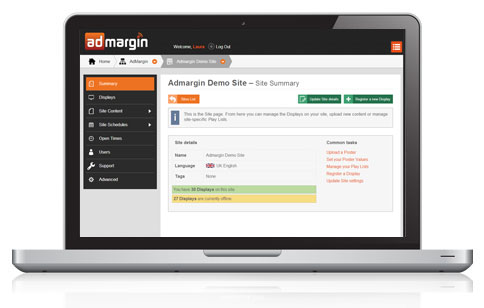
With the AdMargin Manager you can:
- Track their status, their schedules, their currently running content and any problems or connection issues.
- Configure their behaviour and content remotely
- Take screenshots and see the content you are showing at your site
- Group Displays into sites and use Content Tags, Play Lists and Schedules to easily manage the content for devices all across your estate.
Additional and Enterprise Features
Connectivity
Clients connect via secure HTTPS to the AdMargin website for all content. Any additional content - weather or news streams, external Internet resources or user-provided values - are fetched via the AdMargin site to make your internal network security simpler and more reliable. Displays are updated within seconds but can pre-download and retain schedules in advance to support offline behaviour.
Dynamic Play Lists
Users can tailor campaigns to suit location, time or the hardware the clients are running on. Using Play Lists and Content Tags, you can create and manage single schedules, which then adapt to their particular Display, vastly reducing the management complexity of large organisations. Want a special promotion only on Thursdays? Add it to the play list. Want to run video on some displays and images on others? Define different Poster Versions for different hardware. Want it to be on Wednesdays for one particular site? Add an exception - not a whole new list.
Price and Value Injection
With Poster Values, you can create a single poster and inject custom values for your particular site or location. Use Display Clients as dynamic, site-specific menu boards or price lists and then update those values instantly without having to rebuild your media. You can even do this automatically from your own data. The AdMargin Zonal Price API takes the values coming from your own tills, even if they change over the day. Users can add their own values such as menu prices, a message of the day or the number of places left in a booking.